I Built Commando Because My Shell Needed More Than History
On this page
I usually remember what I want the terminal to do. I forget the exact command that does it.
Was it kubectl rollout restart deployment/web -n prod, or did the namespace flag come before the deployment? What was the git log command that filtered by author and file? Which make target does this repository use? I know I ran the command last week, but now it is somewhere inside thousands of history entries.
Every one of these commands is recoverable. I can search shell history, open a README, inspect package.json, look through a notes file, or search the web again. The problem is not access. The problem is interruption. A ten-second lookup is enough to break the flow of what I was actually trying to do.
I built Commando to reduce that interruption.
The command is stored in too many places
Over the years, I have used all the usual solutions:
- Shell history remembers commands I have already run.
- Aliases shorten commands I use frequently.
- Cheat sheets preserve commands I use occasionally.
Makefile,package.json, Gradle, and other project files define commands for a repository.- Notes and bookmarks hold everything that does not fit elsewhere.
Each solution works, but each creates another place to search. Worse, I still have to remember where I stored the command before I can remember the command itself.
Commando puts those sources behind one fuzzy search interface:
- Cheat sheets for reusable, parameterized commands.
- Project commands detected from the folder I am in.
- Bookmarks with searchable tags and notes.
- Shell history read directly from the shell's existing history file.
Press Ctrl-G at any prompt, type the part you remember, and select the result. If the command needs arguments, Commando asks for them and assembles the command while I fill them in.
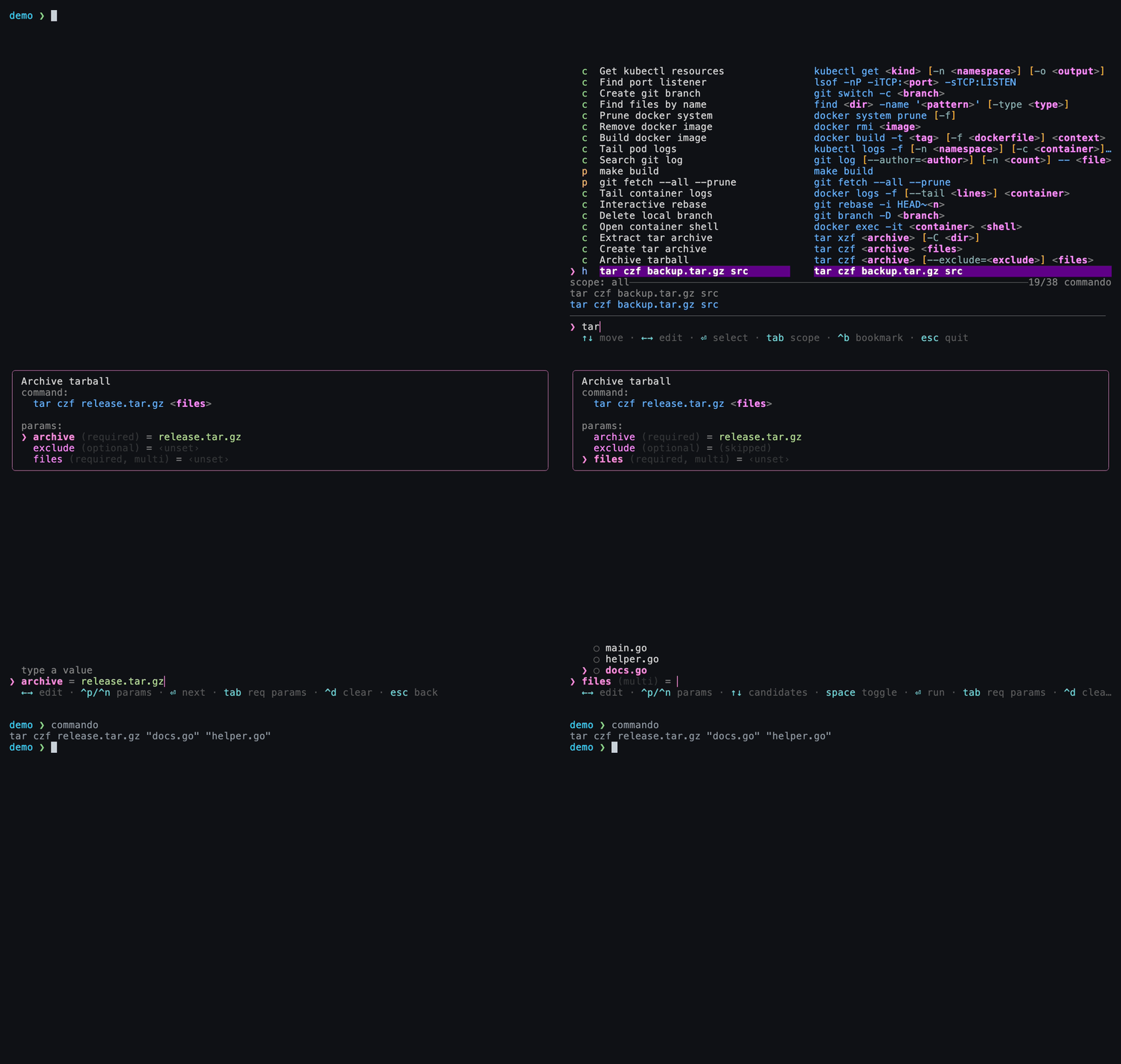
The important part is the last frame: Commando puts the completed command on the prompt. It does not run the command immediately. I can inspect it, change it, and press Enter when I am ready.
Context should do some of the remembering
A command launcher should know where it was opened.
When Commando runs inside a project, it walks up from the current directory and looks for familiar files. A Makefile contributes its targets. A package.json contributes its npm, pnpm, or yarn scripts. It also understands Cargo, Gradle, just, Docker Compose, and common Git actions.
There is nothing new to configure for these. The project already contains the information, so Commando uses it.
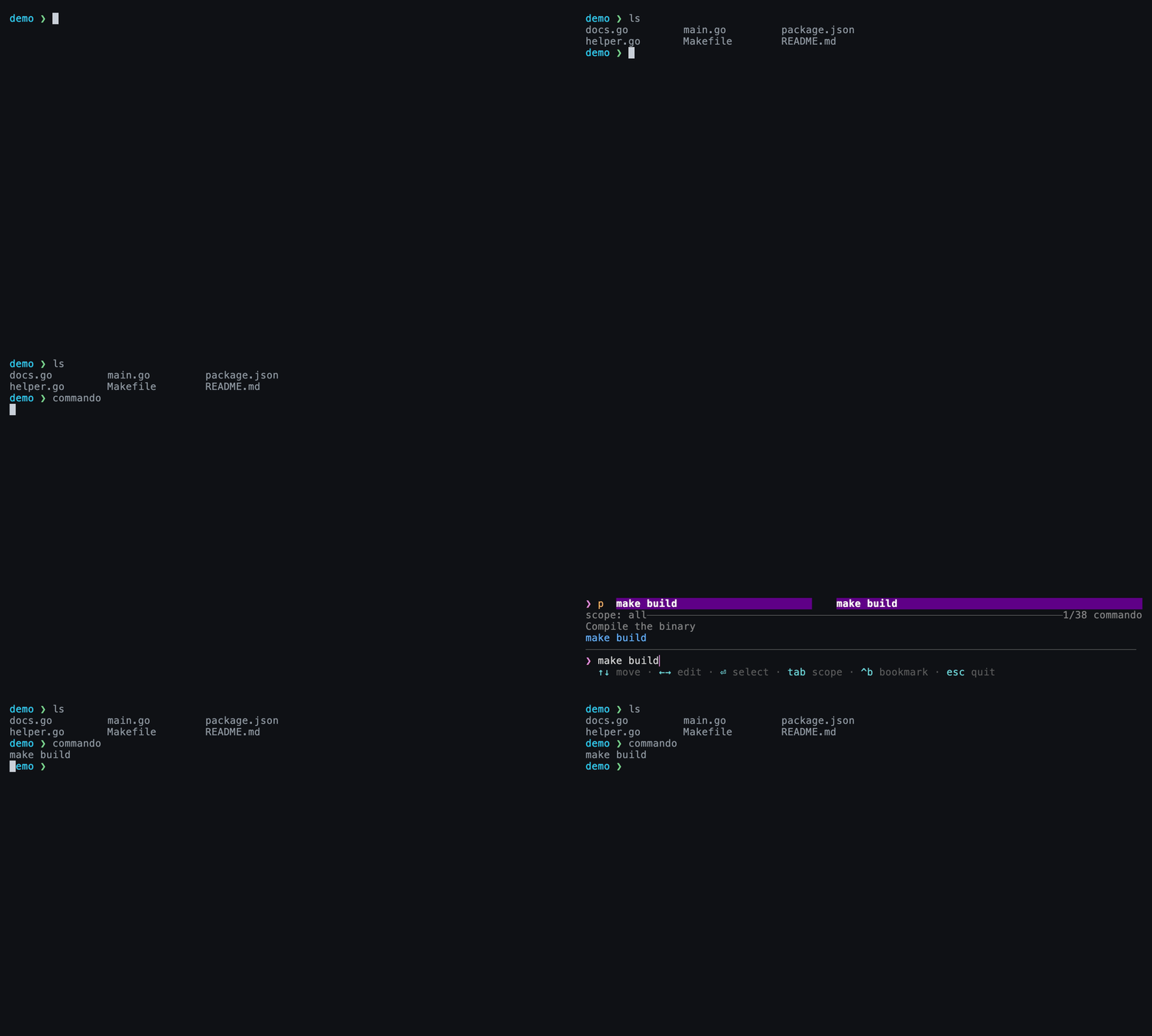
This solves a small but recurring problem. I do not need to remember whether this repository uses make build, npm run build, or some custom script name. I search for "build" and let the current directory narrow the answer.
The same idea applies to custom providers. If a project type has a marker file and a command that can list its tasks, it can become another source in Commando.
Remember the shape, not every value
Some commands are not fixed strings. They have required values, optional flags, and arguments that change every time.
Commando cheat sheets represent that shape in plain TOML:
[[cmd]]
title = "Search git log"
desc = "Search git log by author for a file."
tmpl = "git log [--author=<author>] [-n <count>] -- <file>"
tags = ["git", "log"]

  [[cmd.var]]
  name = "author"
  src = "git log --all --format='%an' | sort -u"

  [[cmd.var]]
  name = "count"
  default = "20"

  [[cmd.var]]
  name = "file"
  multi = true
  remember = "project"
<file> is required. The bracketed --author and -n fragments are optional. If I skip author, the entire --author=<author> fragment disappears instead of leaving a broken flag behind. A multi-select value can add several files while the live preview shows the command being assembled.
The template stores the part worth remembering. I provide only the values that belong to this run.
It also remembers the arguments
Typing the same arguments repeatedly is another form of command recall. Branch names, AWS regions, service names, and environment names tend to repeat within a project.
Commando remembers values per command and variable, then ranks them using frequency and recency. Memory can be global, scoped to a Git project, scoped to a directory, or disabled for sensitive values.
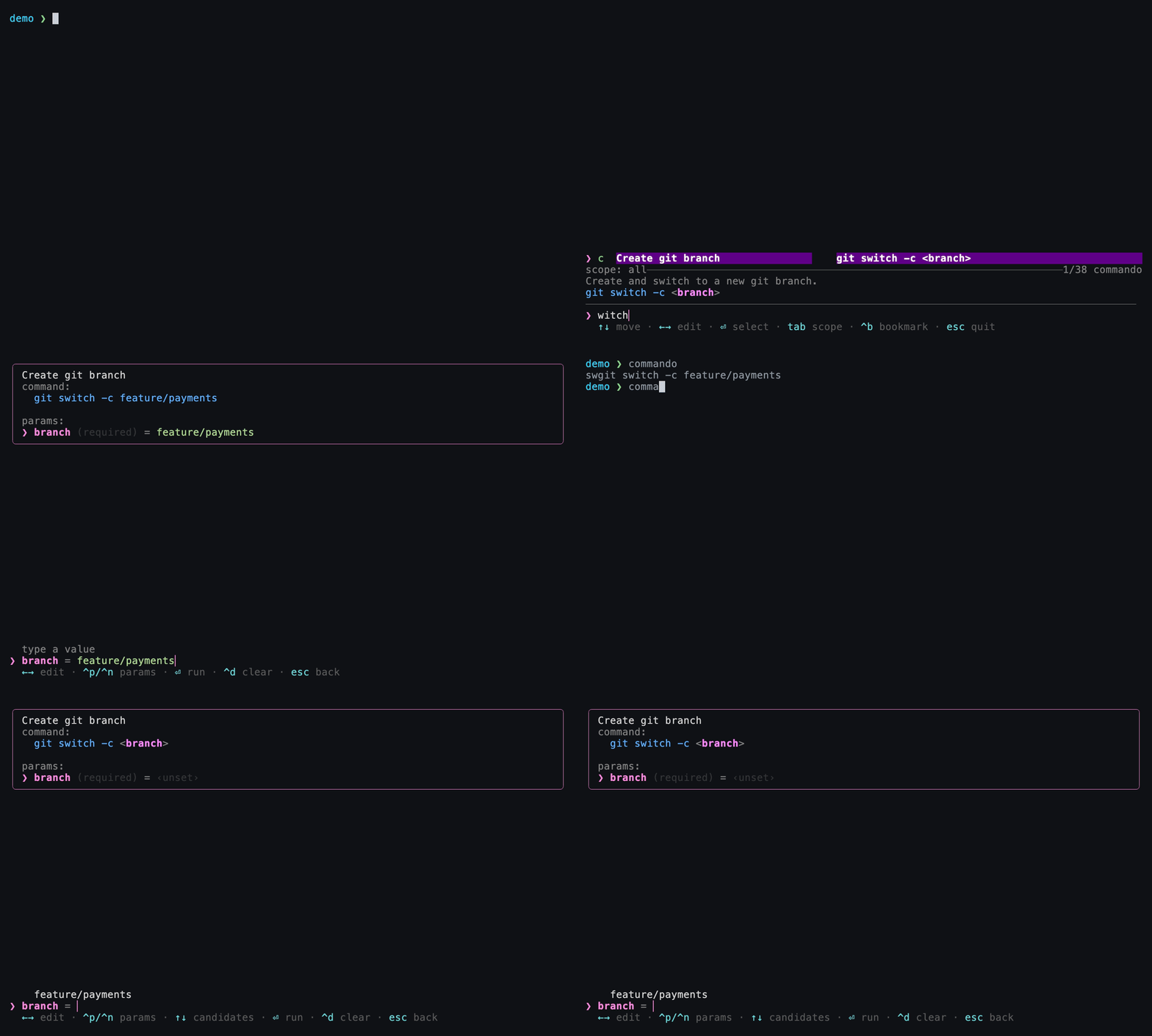
In the example above, I enter feature/payments once. The next time I choose the same Git command, that branch is already the first candidate. I still select it deliberately; Commando does not silently insert remembered values.
All of this state remains inspectable. Cheats, bookmarks, memory, usage data, and configuration are plain TOML files. There is no database, and shell history is read live rather than copied into another store. A tool built to remember things should make it easy to see and edit what it remembers.
The shell still owns execution
Placing the result on the prompt was an important design decision.
If a launcher executes every selection itself, shell built-ins such as cd, aliases, and environment changes become awkward. It also removes the final review step from commands that may have come from old history or a loosely matched search.
Commando uses the native line editor in Zsh, Bash, or Fish to replace the current prompt with the selected command. This keeps the normal shell behavior:
search -> select -> fill arguments -> review on prompt -> runThere is a --exec option for cases where direct execution is useful, but it is not the default. Convenience should shorten the path to a command without hiding the command from me.
Install Commando
On macOS, install it with Homebrew:
brew install --cask Gokuldroid/tap/commandoThen add the integration for your shell:
eval "$(commando init zsh)"        # ~/.zshrc
eval "$(commando init bash)"       # ~/.bashrc
commando init fish | source        # ~/.config/fish/config.fish
Reload the shell and press Ctrl-G. Commando seeds a few starter cheat sheets on the first run, and project detection and history search work without additional configuration.
The release installer, full documentation, and more examples are available on the Commando website. The source is on GitHub.
Small tools compound
Commando does not remove the need to understand commands. I still want to know what a command will do before I run it. It removes the less valuable work of preserving exact syntax in my head.
That distinction matters. My intent is usually stable: build this project, inspect these logs, restart that service, search commits for this file. The exact command is an implementation detail, and implementation details are where a small tool can carry the memory for me.
Saving ten seconds does not sound important. Saving ten seconds without leaving the terminal, losing context, or repeating the same search for the hundredth time is different. Small tools compound because the friction they remove was compounding too.
Share this article